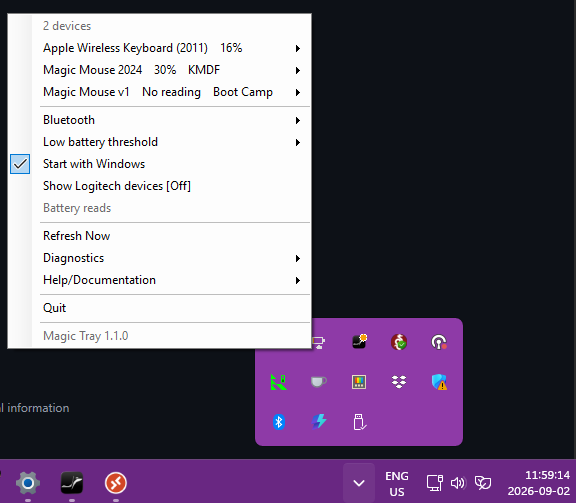
What does Magic Tray do?
Magic Tray is a free Windows 10 and Windows 11 tray app. It shows the battery percent of your Apple Magic Mouse, Magic Keyboard and Magic Trackpad next to the clock, warns you at 10, 5 and 1 percent, and helps an Apple mouse scroll again after you confirm.
A driver is the software Windows uses to talk to your mouse. For older mice Magic Tray only opens the download page.
Which Magic Tray page do I want?
Pick by the problem. Battery percent missing on a mouse or trackpad, start with the battery page. Battery percent missing on a keyboard, you need the one-time unlock. Mouse moves but won't scroll, you need a driver. Not sure which Apple device you own, start with the identification page.
Install it in four steps
- Pair your device in Windows Bluetooth settings.
- Download
MagicMouseTray.exefrom GitHub. - Verify the file by opening PowerShell,
cdto your Downloads folder, then pasting(Get-FileHash MagicMouseTray.exe).Hashand comparing it to the SHA-256 checksum in theSHA256SUMSfile on the release page. - Double-click
MagicMouseTray.exe. - Windows may warn you. Click More info, then Run anyway.
Is Magic Tray free?
Magic Tray costs nothing and always will. It is MIT licensed, every line is public on GitHub, and there is no subscription, no trial, no account and no email address to hand over. Scrolling will not stop working if nobody ever donates a penny.
Is Magic Tray a free alternative to Magic Utilities?
Partly, and it is worth being straight about it. Magic Tray is free and MIT licensed. It shows the battery percent of your Apple mouse, keyboard and trackpad, and for some mice it helps with the driver after you confirm. That is the whole app.
Magic Utilities is paid software and does much more: gestures on the mouse and trackpad, and remapping the keys along the top of a Magic Keyboard. Magic Tray has no gestures and no media-key remapping, and it is not a copy of it. If you need gestures, buy Magic Utilities.
Questions
- What does Magic Tray do?
- Magic Tray shows how much battery your Apple Magic Mouse, Magic Keyboard or Magic Trackpad has left, next to the Windows 10 or Windows 11 clock. It warns you at 10, 5 and 1 percent. It can also help an Apple mouse scroll again, after you confirm.
- Is Magic Tray free?
- Yes. It is MIT licensed and every line is public on GitHub. There is no subscription, no trial, no account and no email address to hand over.
- Is Magic Tray a free alternative to Magic Utilities?
- Partly. Magic Tray is free, shows battery percent, and can help a Magic Mouse scroll after you confirm. It has no gestures and no media-key remapping, so it is not a Magic Utilities clone. Magic Utilities is paid and does gestures. If you want gestures, buy it.
- How do I check my Apple Magic Mouse battery on Windows 10 or 11?
- Pair the mouse in Windows Bluetooth settings, then download
MagicMouseTray.exeand run it. A tray icon appears next to the clock with the percent beside it. Windows may hide it behind the ^ arrow, so drag it out. Full steps are on the battery page. - Is Magic Tray a desk stand?
- No. Magic Tray is downloadable Windows software that sits beside your Windows 10 or 11 clock. It is not a desk tray, riser or cradle for an Apple keyboard.
- Does Magic Tray work on Windows 10?
- Yes. Magic Tray runs on 64-bit Windows 10 version 1809 or newer, and on any Windows 11.
- Does an Apple Magic Mouse work with Windows 11?
- Yes. Pair it in Windows Bluetooth settings and it clicks and moves straight away, on Windows 11 and Windows 10. Scrolling with one finger is the part Windows doesn't do, and that needs a driver. Magic Tray adds the battery percent Windows never shows.
- Do I need a Mac to use an Apple mouse or keyboard on Windows?
- No. Magic Tray is a Windows PC app and everything here runs on Windows 10 or Windows 11 alone. Apple's old mouse drivers are called Boot Camp, which is a Mac name, but you download and install them on Windows without owning a Mac.
- Is Magic Tray safe to install?
- Magic Tray is MIT licensed and every line is public on GitHub, so you can read what it does. Windows warns you on first run because nobody has paid for Microsoft's check, which costs money. Magic Tray changes no driver until you pick one and confirm.
- Will Magic Tray change my drivers on its own?
- No. Magic Tray only touches a driver after you pick it from the tray menu and confirm.